TSQL: find out which table a constraint belongs to
TSQL: find out which table a constraint belongs to
SELECT
   OBJECT_NAME(o.parent_object_id)
FROM
   sys.objects o
WHERE
   o.name = 'ConstraintABC' AND o.parent_object_id <> 0
TSQL: find out which table a constraint belongs to
SELECT OBJECT_NAME(o.parent_object_id) FROM sys.objects o WHERE o.name = 'ConstraintABC' AND o.parent_object_id <> 0
this solution worked for me (https://productforums.google.com/d/msg/chrome/ZE4c98nklAw/47xvIIz8zN8J) 1. run cmd as administrator 2. type in "netsh winsock reset" 3. restart pc
//Set up a viewmodel MyViewModel to contain the following

        [DisplayName("Available Products")]
        public IList AvailableProducts { get; set; }
        public IList SelectedProducts { get; set; }

        public PostedProducts PostedProducts { get; set; }


//The definition of ProductDropdownItemViewModel and PostedProducts are:

    public class PostedProducts
    {
        public int[] ProductIds { get; set; }
    }

    public class ProductDropdownItemViewModel
    {
        public int Id { get; set; }
        public string Name { get; set; }
    }


//In your controller method populate the above viewmodel

  e.g.
                MyViewModel.AvailableProducts = db.Products
                .Select(p => new ProductDropdownItemViewModel
            {
                Id = p.Id,
                Name = p.Name
            }).ToList();


//In your view display the checkbox list this way

  e.g. the postback method name is Edit

     @model MyViewModel
     @using (Html.BeginForm("Edit", FormMethod.Post, new { enctype = "multipart/form-data" }))
     {
        @Html.CheckBoxListFor(x => x.PostedProducts.ProductIds,
                      x => x.AvailableProducts,
                      x => x.Id,
                      x => x.Name,
                      x => x.SelectedProducts,
                      MvcCheckBoxList.Model.Position.Vertical)
     }


//In your postback method Edit use the following code to retrieve your selected items


       public ActionResult Edit(PostedProducts postedProducts)
       {

                foreach (var id in postedProducts.ProductIds)
                {
                     //do whatever you like with the selected product id
                }

       }
IF  NOT EXISTS (SELECT * FROM sys.objects
WHERE object_id = OBJECT_ID(N'[dbo].[table1]') AND type in (N'U'))

BEGIN

CREATE TABLE [dbo].[table1](
 [Id] [int] IDENTITY(1,1) NOT NULL,
 [Name] [nvarchar](150) NOT NULL,
 CONSTRAINT [PK_abc] PRIMARY KEY CLUSTERED
(
 [Id] ASC
)WITH (PAD_INDEX = OFF, STATISTICS_NORECOMPUTE = OFF, IGNORE_DUP_KEY = OFF, ALLOW_ROW_LOCKS = ON, ALLOW_PAGE_LOCKS = ON) ON [PRIMARY]
) ON [PRIMARY]


END
go
public void ReadExcel(HttpPostedFileBase file, string currentUserName)
        {

            DataTable tbContainer = new DataTable();
            string strConn = XlsConnectionString = "Provider=Microsoft.Jet.OLEDB.4.0;Data Source=" + file.FileName +";Extended Properties='Excel 8.0;HDR=Yes;IMEX=1;'";
            string sheetName = "sheet1";
            FileInfo fileInfo = new FileInfo(file.FileName);
            OleDbConnection cnnxls = new OleDbConnection(strConn);
            OleDbDataAdapter oda = new OleDbDataAdapter(string.Format("select * from [{0}$]", sheetName), cnnxls);
            DataSet ds = new DataSet();
            oda.Fill(tbContainer);
            var newParcelTubeExport = new ParcelTubeExport();

            //your code to utilize the data

         }
function round(value, decimals) {
    return Number(Math.round(value + 'e' + decimals) + 'e-' + decimals);
}
$(function () {
    $('.decimal10n2').keyup(function () {
        if (!$(this).val().match(/./gi) || !$(this).val().match(/[0-9]+/g)) {
            $(this).val("");
        }
        else if ($(this).val().split('.').length - 1 > 1)
        {
            this.value = $(this).val().slice(0, -1);
        }
        else if ($(this).val().indexOf('.') != -1) {
            if($(this).val().split(".")[0].length > 10)
            {
                if (isNaN(parseFloat(this.value))) return;
                this.value = $(this).val().split(".")[0].slice(0,-1);
            }
            else if ($(this).val().split(".")[1].length > 2) {
                if (isNaN(parseFloat(this.value))) return;
                this.value = parseFloat(this.value).toFixed(2);
            }
        }

        return this;
    });
});
$(document).ready(function () {
    $(".navbar-sub-opener").click(function (evt) {
        //close submenu when click away - part 2
        evt.stopPropagation();
        //hide all submenus
        $(".navbar-sub").hide();
        //only open the one that's immediate inside the clicked parent menu item
        $(this).next($(".navbar-sub")).show();
    });

    //close submenu when click away - part 1
    $('html').click(function () {
        $(".navbar-sub").hide();
    });
});
jQuery.fn.center = function () {
    this.css("position", "fixed");
    this.css("top", ($(window).height() / 2) - (this.outerHeight() / 2));
    this.css("left", ($(window).width() / 2) - (this.outerWidth() / 2));
    return this;
}
required javascript:
$(document).ready(function () {
    $(".popupformContainer").dialog({
        height: 600,
        width: 300,
        autoOpen: false,
        modal: true,
        open: function (event, ui) {
            $(this).load("/controllername/actionname", { "parameter": $(this).data("parametervalue") }, function (html) {
            });
        },
        close: function (event, ui) {
            event.preventDefault();
            alert("closing");
        },
        buttons: {
            text: "提交", click: function (event) {
                event.preventDefault();
                $.validator.unobtrusive.parse("#PopupForm");
                $("#PopupForm").validate();
                if ($("#PopupForm").valid()) {
                    $("#PopupForm").submit();
                }
                else {
                    event.preventDefault();
                    alert("invalid");
                }
            }
        }
    });

    $(".btnOpenPopupForm").click(function () {
        $(".popupformContainer").data("parameter", $(this).attr("value")).dialog("open");
    });


});
in the parent view you need the button to open popup with class "btnOpenPopupForm" and an empty div with class "popupformContainer" for hosting the popup
update student
set isOdd = 1, isEven = 0
where exammark % 2 =1
use UrlHelper WebViewPage.Url

return Redirect(Request.UrlReferrer.ToString());
make sure the form declaration in the view has all necessary attributes, e.g.
public void UploadProductImage(HttpPostedFileBase file)
{
string subPath = "~/Images/";
bool isExists = System.IO.Directory.Exists(Server.MapPath(subPath));
if (!isExists)
{
System.IO.Directory.CreateDirectory(Server.MapPath(subPath));
}
if (file != null)
{
string pic = System.IO.Path.GetFileName(file.FileName);
string path = System.IO.Path.Combine(Server.MapPath(subPath), pic);
file.SaveAs(path);
UploadProductImageThumbnail(file, productId);
}
}
public void UploadProductImageThumbnail(HttpPostedFileBase file)
{
using (var image = Image.FromStream(file.InputStream, true, true))
{
var thumbWidth = 50;
var thumbHeight = 50;
using (var thumb = image.GetThumbnailImage(
thumbWidth,
thumbHeight,
() => false,
IntPtr.Zero))
{
var jpgInfo = ImageCodecInfo.GetImageEncoders()
.Where(codecInfo => codecInfo.MimeType == "image/jpeg").First();
using (var encParams = new EncoderParameters(1))
{
string thumbPath = "~/Images/Thumbnails";
bool isExists = System.IO.Directory.Exists(Server.MapPath(thumbPath));
if (!isExists)
{
System.IO.Directory.CreateDirectory(Server.MapPath(thumbPath));
}
var thumbPathFull = Path.Combine(Server.MapPath(thumbPath), file.FileName);
long quality = 100;
encParams.Param[0] = new EncoderParameter(Encoder.Quality, quality);
thumb.Save(thumbPathFull, jpgInfo, encParams);
}
}
}
}
products = products.Where(p =>
                    SqlFunctions.StringConvert((double)p.ProductId).Trim() == searchString);
protected void RadGrid1_DataBound(object sender, eventargs e)
{
GridItem commandItem = RadGrid1.MasterTableView.GetItems(GridItemType.CommandItem)[0];
Button button1 = commandItem.FindControl("button1") as Button;
}
string script = "function f(){$find(\"" + RadWindow1.ClientID + "\").show(); Sys.Application.remove_load(f);}Sys.Application.add_load(f);";
ScriptManager.RegisterStartupScript(this, this.GetType(), "key", script, true);
alternative is to use plain javascript, doesn't behave as nice but it works.
function toggleCourseDescriptions(conditioner) {
var targetCtrl = document.getElementById("divCourseDescription");
var triggerControl = document.getElementById("aToggleCourseDescription");
if (targetCtrl.style.display == 'none') {
targetCtrl.style.display = null;
} else {
targetCtrl.style.display = 'none';
}
if (triggerControl.text == "-") {
triggerControl.text = "+";
} else {
triggerControl.text = "-";
}
}
((int)(((decimal)(a.Category.Sum(l => l.Quantity) : 0) / MyDividerInteger) * 100)).ToString() + "%",
MenuItem item = menu.FindName("ContextMenuItemToggleReporting") as MenuItem;// .Single(i=>((MenuItem)item).Name == "ContextMenuItemToggleReporting") as MenuItem;
if ([you condition logic here. e.g. MyEntity.IsReportingEnabled])
{
item.Header = "Disable Reporting";
}
else
{
item.Header = "Enable Reporting";
}
I have a relative layout with a scrollview and a AdMob in it. The AdMob on the bottom overlaps the the scrollview so that the bottom part of the scrollview can never be seen. After a lot of trial and error I found that the solution is simple: set the ScrollView to android:layout_above="@+id/adView".
So the layout structure is something like this:
<RelativeLayout xmlns:android="http://schemas.android.com/apk/res/android"
xmlns:ads="http://schemas.android.com/apk/lib/com.google.ads"
xmlns:tools="http://schemas.android.com/tools"
android:layout_width="fill_parent"
android:layout_height="fill_parent"
android:orientation="vertical" >
<ScrollView
android:id="@+id/scrollView_home"
android:layout_width="fill_parent"
android:layout_height="wrap_content"
android:layout_above="@+id/adView"
android:layout_alignParentTop="true"
android:background="@drawable/background"
android:orientation="vertical" >
.....
.....
.....
</ScrollView>
<com.google.ads.AdView
xmlns:ads="http://schemas.android.com/apk/lib/com.google.ads"
android:id="@+id/adView"
android:layout_width="wrap_content"
android:layout_height="wrap_content"
android:layout_alignParentBottom="true"
ads:adSize="SMART_BANNER"
ads:adUnitId="abcdefg"
ads:loadAdOnCreate="true" />
</RelativeLayout>

use COLLATE NOCASE
e.g. db.query("mytable", new String[]{.....}, "productname = '" + value + "' COLLATE NOCASE", null, null, null, null);
This is rather wierd, when you want to assign an integer to a TextView apparently you need to assign the combination of "" + and your integer value.
I have an asp.net webforms application with later on added mvc component. The login view is embeded inside the homepage Default.aspx. When I type into browser and try to open a login controlled URL without loggged in, i should be redirected to the Default.aspx homepage for login, but instead I get 404 not found error looking for "/Account/Login".
The solution worked for me is rather wierd:
add the following setting in AppSettings section of your web.config

if (!page.ispostback)
{
RadGrid1.MasterTableView.FilterExpression = "([Country] LIKE \'%Germany%\') ";
        GridColumn column = RadGrid1.MasterTableView.GetColumnSafe("Country");
        column.CurrentFilterFunction = GridKnownFunction.Contains;
        column.CurrentFilterValue = "Germany";
        RadGrid1.MasterTableView.Rebind();
}
EXEC sp_MSforeachdb 'USE ?
select ''?'' as DatabaseName, st.name as TableName,si.name as IndexName from sys.indexes si
inner join sys.tables st
on
si.object_id = st.object_id
where si.name like ''%NC_explore_user%'''
the solution for me is to have this under
also you need to make sure your hosting environment is setup for .net v4.x and integrated mode
ViewData/ViewBag : only eixsts for single controller request on single view
Imaging there is a many to many relationship between category and product and there are some specific information required on this many to many relationship, therefore we need a dedicated entity CategoryProduct to work with. On submission I need to validate whether the combination of category and product selections already exist.
in validation controller provide:
public JsonResult ValidateCategoryProduct(int? categoryProductId, int categoryId, int productId)
{
if (!categoryProductId.HasValue)
{
categoryProductId = -1;
}
var validationResult = categoryProductRepository.ValidateCategoryProduct(categoryProductId.Value, categoryId, productId);
if (validationResult)
{
return Json(true, JsonRequestBehavior.AllowGet);
}
else
{
string output = "This category product relationship has already been setup.";
return Json(output, JsonRequestBehavior.AllowGet);
}
}
in my model I have
[DisplayName("CategoryId")]
[Remote("ValidateCategoryProduct", "ValidationLogic", AdditionalFields = "CategoryProductId,ProductId")]
[Editable(true)]
public int CategoryId { get; set; }
[DisplayName("ProductId")]
[Required(ErrorMessage = "Please select a Product")]
[Remote("ValidateCategoryProduct", "ValidationLogic", AdditionalFields = "CategoryProductId,CategoryId")]
[Editable(true)]
public int ProductId { get; set; }
in my view I have the following under the category textbox
@Html.ValidationMessageFor(model => model.CategoryId, "*")
I also have the following under the productid textbox
@Html.ValidationMessageFor(model => model.ProductId, "*")
now we are good to go, the only issue left is that we need to figure out a way to apply validation result to both properties at once..... puzzled at the moment.
.CellAction(cell=>{
if (cell.Column.Title == "Delete" && cell.DataItem.ChildRecords.Count > 0)
{
cell.HtmlAttributes["style"] = "visibility:hidden";
}
})
alternatively:
columns.Template(
@
).Title("Delete");
RadDatePicker1.get_dateInput().get_selectedDate().format("dd/MM/yyyy");
$('[id*=ddlCountry] option:selected').text()
IF NOT EXISTS(select * from sys.DEFAULT_CONSTRAINTS where NAME like 'def_myconstraint1%')
BEGIN
ALTER TABLE mytable1
ADD CONSTRAINT def_myconstraint1 DEFAULT 1 FOR mycolumn1
END
GO
tried to use text-align:center didnt work, the correct way is:
width: 10240px ;
  margin-left: auto ;
  margin-right: auto ;
asp.net web application update web.config SMTP settings in global.ascs application_start():
headache solved after search and search and search for solutions:
regular expression for character range:
e.g. between 1 and 500:
^.{1,500}$
on one page my checkboxlist shows up correctly, on another it never does. After hours of trying I figured this out: assign CheckBoxList class to your css class of the checkboxlist, play with the properties inside the class will help you fix the issues.
.CheckBoxList input
{
margin-left: -10px;
}
.CheckBoxList td
{
padding-left: 10px;
width:80%;
}
--1.make sure all records have a value in the column
update [TableName]
SET [ColumnName] = [Default Value]
--2. change the column to not null
ALTER TABLE [TableName]
ALTER COLUMN [ColumnName] [data type] NOT NULL
GO
--3. add default value constraint to the column
ALTER TABLE [TableName] WITH NOCHECKADD CONSTRAINT [DF_DefaultName] DEFAULT [Default Value] FOR [ColumnName]
GO
I have 3 projects, one with the entity model, another one with the OData v3 service generated from the entity model, the third one is an asp.net web application.
During local development the service reference I added into the web app is from same solution: http://localhost:55001/MyModelService.svc
After everything was successfully tested I then published the service project and hosted it on a third party hosting service. I was able to browse the service successfully by going: http://service.myapp.com/MyService.svc
I then re-added the existing service reference into my web app with the remote url shown above, published the web app on another hosting service.
When I load up the web app I got an error:
DataServiceQueryException was unhandled by user code
An error occurred while processing this request.
The issue turned out to be really fundamental which I missed out through all my WCF learnings: the cross domain policy xml!
The solution is to add a clientaccesspolicy.xml into the OpenAccess Service WCF app root folder with the following content:

Step 1:
Open EXCEL, click on tab "Data", select "From Text".
Step 2:
Browse to your local file folder and open the .csv file.
Step 3:
In the "Text Import Wizard - Step 1 of 3" popup, select "Delimited" and click on "Next".
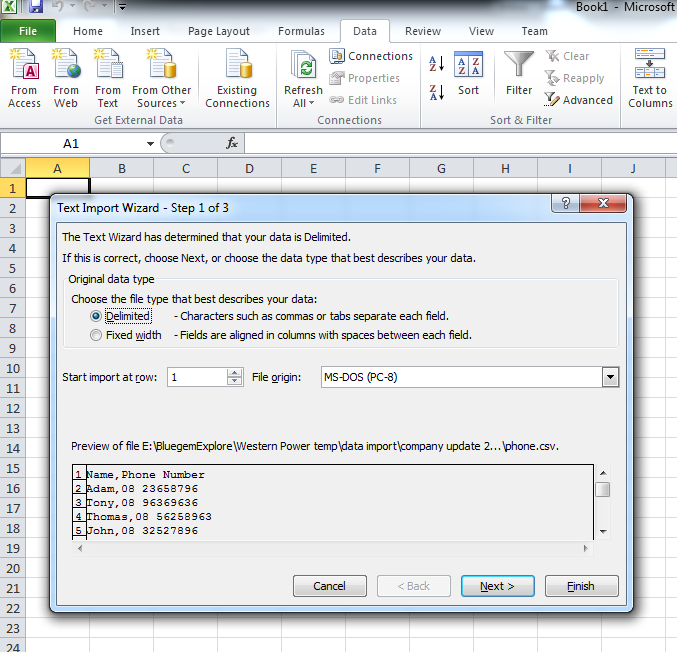


List
string path = HttpContext.Current.Server.MapPath("~/xxxxxxxx.txt");
if (!System.IO.File.Exists(path))
{
// Create a file to write to.
using (StreamWriter sw = System.IO.File.CreateText(path))
{
sw.WriteLine("-------------------------------------------------------------------------------------------------------------------------------------");
sw.WriteLine("-------------------------------------------------------------------------------------------------------------------------------------");
sw.WriteLine("------------------------Some explanation of the purpose of this file-----------------------------");
sw.WriteLine("-------------------------------------------------------------------------------------------------------------------------------------");
sw.WriteLine("-------------------------------------------------------------------------------------------------------------------------------------");
}
}
using (StreamWriter sw = System.IO.File.AppendText(path))
{
StringBuilder sb = new StringBuilder();
sb.AppendLine("- - - - - - - - - - - - - - - - - - - - - - - - - - - - - - - - - - - - -");
sb.AppendLine("- - - - - - - - - - - - - - - - - - - - - - - - - - - - - - - - - - - - -");
sb.AppendLine("WHEN: " + DateTime.Now.ToString());
sb.AppendLine("WHO: " + GetCurrentUser());
IPHostEntry host;
host = Dns.GetHostEntry(Dns.GetHostName());
foreach (IPAddress ip in host.AddressList)
{
if (ip.AddressFamily.ToString() == "InterNetwork")
{
sb.AppendLine("WHERE: " + ip.ToString());
break;
}
}
sb.AppendLine("WHAT: " + errorMsg);
sb.AppendLine();
sb.AppendLine();
sb.AppendLine();
sw.WriteLine(sb.ToString());
}
find and run the following executable inside "%Windows\Microsoft.NET\[framework number]\[version number]\"
aspnet_regsql.exe
if the control you are looking for is a button:
((Button)e.CommandSource)
if the control you are looking for is a label:
((Label)e.CommandSource)
var width = $telerik.$(window).width() * 0.8;
var height = $telerik.$(window).height() * 0.95;
ExpWindow.setSize(width, height);
ExpWindow.center();
protected void
StiWebDesigner1_SaveReport(object sender,
protected void RadGrid1_DetailTableDataBind(object source, Telerik.Web.UI.GridDetailTableDataBindEventArgs e) { GridDataItem dataItem = (GridDataItem)e.DetailTableView.ParentItem; switch (e.DetailTableView.Name) { GetDataByParentId(dataItem.GetDataKeyValue("Id").ToString()); } }
StringBuilder sb = new StringBuilder();
TextBox TextBox1 = new TextBox ();
TextBox1.ID = "TextBox1";
TextBox1.Text = "Hello World";
using (StringWriter sw = new StringWriter(sb))
{
using (HtmlTextWriter tw = new HtmlTextWriter(sw))
{
TextBox1.RenderControl(tw);
}
}
datetime value can be updated using the following query:
e.g. I want to replace the year value with '2012'
update table1
set date = convert(datetime,'2012'+'-'+convert(varchar(3),MONTH(date))+'-'+convert(varchar(3),DAY(date))+' '+ convert(varchar(12),convert(time,date))),
CompletedDate = convert(datetime,'2012'+'-'+convert(varchar(3),MONTH(CompletedDate))+'-'+convert(varchar(3),DAY(CompletedDate))+' '+ convert(varchar(12),convert(time,CompletedDate)))
where [condition]
I can add a new column to an existing table no problem, but i had problem making it an autoincrement int primary key. After some research I found the solution: "Identity" keyword:
if not exists(SELECT * FROM INFORMATION_SCHEMA.COLUMNS WHERE TABLE_NAME = 'table1' AND COLUMN_NAME = 'ID')
begin
ALTER TABLE dbo.table1
add ID int identity not null
end
go
I have this line to run a javascript from code behind:
ScriptManager.RegisterStartupScript(this.Page, this.Page.GetType(), "sbScript", sbScript.ToString(), false);
This line is inside pageload event of the usercontrol that I used my my aspx page. The user control is used multiple times on the aspx page. The javascript is therefore called multiple times. However the script only works the first time.
The reason being is because the script name specified is always "sbScript" which has been assigned value when first run. The solution is to make sure the script name is set to different values everytime the line is executed.
I converted my website to a web application and upgraded .net framework from v3.5 to v4. I also setup a class library to host entity framework models for the web app to consume. At run time when the business logic calls the entity framework class library I got this error below.
in my asp.net web application I got this problem when added a new class library into my solution and trying to build the solution:
"assembly generation failed referenced assembly does not have a strong name"
Apparently the solution is to go to the class Project properties: Solution Explorer > right click > properties, click on Signing tab, select "Sign the assembly", then browse the key shared among other projects within the same solution.
if ($('#isAgeSelected').is(':checked')){
//your code here
}
DATEPART(portion, datetimevalue)
the options for portion are:
Ms for Milliseconds
Yy for Year
Qq for Quarter of the Year
Mm for Month
Dy for the Day of the Year
Dd for Day of the Month
Wk for Week
Dw for the Day of the Week
Hh for Hour
Mi for Minute
Ss for Second
e.g.
select startdate,DATEPART(Hh,a.startdate)
this returns the hour of startdate
if you want something like "22/11/2012 15:00" then use
columns.Bound(o => o.MyDateTimeValue).Format("{0:dd/MM/yyyy HH:mm}").Width(120);
if you want something like "22/11/2012 3:00 PM" then use
columns.Bound(o => o.MyDateTimeValue).Format("{0:dd/MM/yyyy hh:mm tt}").Width(120);
i keep forgetting this simple solution:
char(13)
now I save it here so that I never forget again
I have a multi-line postal address (string PostalAddressString) like this:
Address1:12 Garden Street
Address2:
Suburb:Abc
PostCode:123
State:BC
Country:ABCDE
Use this method:
OnDetailTableDataBind(object sender, GridDetailTableDataBindEventArgs e)
The ParentKeyValues can be accessed this way:
e.DetailTableView.ParentItem.GetDataKeyValue("StoreId")
update d
set d.dname = "HR"
from Department d
inner join employee e
on e.employeeID = d.employeeID
where d.departmentID = 1
When I setup master detail table relationship in my report i noticed that the master records which do not have any related detail records will not be shown.
The trick is to set "Print if Detail Empty" property of the master data band to "true"
have a reference:
using System.Web.Configuration;
WebConfigurationManager.AppSettings["propertyName"]
solution is to have a corresponding GridBoundColumn, and set DefaultInsertValue="false" in the column definition
my radgrid uses Tempalte in EditFormSettings. It current contains 2 pages of data.
When I click on Add New Record the command button on top of the grid, the edit form opens correctly in insert mode. However when I look closely at the data, it actually shows the second page, and the page number on the bottom of the grid shows "2".
The solution is to set
--rename a table:
EXEC sp_rename 'OldTableName', 'NewTableName'
--rename a column:
EXEC sp_rename
@objname = 'TableName.OldColumnName',
@newname = 'NewColumnName',
@objtype = 'COLUMN'
Class1 obj= new Class1();
string propertyName = "name1";
string objValue = "";
Type type = obj.GetType();
PropertyInfo prop = type.GetProperty(propertyName );
prop.SetValue(obj, objValue , null);
string text1 = this.Server.MapPath("~/" + [FileFolder]);
if (Directory.Exists(text1))
{
string text2 = text1 + @"\[File Name with extension]";
if (System.IO.File.Exists(text2))
{
FileStream stream1 = new FileStream(text2, FileMode.Open, FileAccess.Read);
byte[] buffer1 = new byte[((int)stream1.Length) + 1];
stream1.Read(buffer1, 0, (int)stream1.Length);
stream1.Close();
//Writes the file out the Response object
Response.Clear();
Response.Buffer = true;
Response.AddHeader("Content-Disposition", "attachment;filename=\"[File Name with extension]\";");
Response.WriteFile(text2, true);
Response.ContentType = "application/x-zip-compressed";
Response.BinaryWrite(buffer1);
Response.End();
}
}
http://weblogs.asp.net/scottgu/archive/2007/07/11/linq-to-sql-part-4-updating-our-database.aspx
found this helpful
http://visualstudiohacks.com/general/confessions-of-a-keyboard-junkie/
String sConnectionString = "Provider=Microsoft.Jet.OLEDB.4.0;" +
"Data Source=" + RadUpload.UploadedFiles[0].FileName+";" +
"Extended Properties=Excel 8.0;";
OleDbConnection objConn = new OleDbConnection(sConnectionString);
objConn.Open();
OleDbCommand cmdSelectAdditions = new OleDbCommand("SELECT * FROM [Sheet1$]", objConn);
OleDbDataAdapter AdapterForAdditions = new OleDbDataAdapter();
AdapterForAdditions.SelectCommand = cmdSelectAdditions;
DataSet dsAdditions = new DataSet();
AdapterForAdditions.Fill(dsAdditions);
objConn.Close();
this article helped me, hope it helps you too!
http://www.4guysfromrolla.com/articles/030911-1.aspx
I need to parse HTML into the pdf, the implementation is:
Response.ContentType = "application/pdf";
Response.AddHeader("content-disposition", "attachment;filename=Transactions.pdf");
Response.Cache.SetCacheability(HttpCacheability.NoCache);
Document document = new Document(PageSize.A1, 10f, 10f, 10f, 0f);
PdfWriter.GetInstance(document, Response.OutputStream);
// Open the Document for writing
document.Open();
string documentContent = string.Empty;
document.NewPage();
documentContent = "Confirmation" + "
" + body;
StringReader sr = new StringReader(documentContent);
foreach (object item in HTMLWorker.ParseToList(sr, null).ToList())
{
document.Add((IElement)item);
}
document.Close();
Response.Write(document);
Response.End();
found this article very helpful
http://support.microsoft.com/kb/306572/
I modified it a bit to work for me (I am using RadUpload to get the file):
// Create connection string variable. Modify the "Data Source"
// parameter as appropriate for your environment.
String sConnectionString = "Provider=Microsoft.Jet.OLEDB.4.0;" +
"Data Source=" + ruImporter.UploadedFiles[0].FileName+";" +
"Extended Properties=Excel 8.0;";
// Create connection object by using the preceding connection string.
OleDbConnection objConn = new OleDbConnection(sConnectionString);
// Open connection with the database.
objConn.Open();
// The code to follow uses a SQL SELECT command to display the data from the worksheet.
// Create new OleDbCommand to return data from worksheet.
OleDbCommand objCmdSelect = new OleDbCommand("SELECT * FROM [Sheet1$]", objConn);
// Create new OleDbDataAdapter that is used to build a DataSet
// based on the preceding SQL SELECT statement.
OleDbDataAdapter objAdapter1 = new OleDbDataAdapter();
// Pass the Select command to the adapter.
objAdapter1.SelectCommand = objCmdSelect;
// Create new DataSet to hold information from the worksheet.
DataSet objDataset1 = new DataSet();
// Fill the DataSet with the information from the worksheet.
objAdapter1.Fill(objDataset1);
// Clean up objects.
objConn.Close();
this script only works with combination of firstname+' '+lastname.
--firstname
SUBSTRING(fullname, 1, CHARINDEX(' ', fullname) - 1) as firstname
--lastname
SUBSTRING(fullname, CHARINDEX(' ', fullname) + 1, LEN(fullname)) as lastname
thanks to many similar sources on the web, I came up with my script, it splits up a comma seperated string into a table with duplicate records removed
IF EXISTS (SELECT * FROM sys.objects WHERE object_id = OBJECT_ID(N'[dbo].[Spliter]') AND type in (N'FN', N'IF', N'TF', N'FS', N'FT'))
DROP FUNCTION [dbo].Spliter
GO
CREATE FUNCTION Spliter(@String varchar(max), @Delimiter char(1))
returns @temptable TABLE (items varchar(max))
as
begin
declare @idx int
declare @slice varchar(8000)
select @idx = 1
if len(@String)<1 or @String is null return
while @idx!= 0
begin
set @idx = charindex(@Delimiter,@String)
if @idx!=0
set @slice = left(@String,@idx - 1)
else
set @slice = @String
if(len(@slice)>0 and (select count(items) from @temptable where items = @slice)=0)
insert into @temptable(Items) values(@slice)
set @String = right(@String,len(@String) - @idx)
if len(@String) = 0 break
end
return
end
GO
SELECT i.items FROM dbo.Spliter(@tempstring,',') AS i where items not in (select comparesource from comparesourcetable)
found these properties quite handy when you want to give end user limited access when designing the report in web browser, especially when you want to hide the connection string credentials.
StiWebDesignerOptions.Dictionary.AllowModifyDictionary = true;
StiWebDesignerOptions.Dictionary.AllowModifyConnections = false;
StiWebDesignerOptions.Dictionary.ShowConnectionType = false;
StiWebDesignerOptions.Dictionary.AllowModifyDataSources = false;
StiWebDesignerOptions.Dictionary.AllowModifyVariables = true;
just put them before swdCustomReport.Design(report); in your code
I got this message:
Saving changes is not permitted. The changes you have made require the following tables to be dropped and re-created. You have either made changes to a table that can't be re-created or enabled the option Prevent saving changes that require the table to be re-cretead.
the solution is:
Tools > Options > Designers > Table and Database Designers
unselect 'Prevent saving changes that require the table to be re-created' check box
var rtbName = $find("<%= rtbName.ClientID %>");
rtbName.set_value('Hello World');
SUBSTRING([TheString], patindex('%[^0]%',[TheString]), 10)
public static Color FindeOppositeColor(Color InputColour)
{
return Color.FromArgb(255 - InputColour.R, 255 - InputColour.G, 255 - InputColour.B);
}
sometimes i need to open radwindow from server side, I use this code snippet from Telerik:
protected void Button1_Click(object sender, EventArgs e)
{
Telerik.WebControls.RadWindow newwindow = new Telerik.WebControls.RadWindow();
newwindow.ID = "RadWindow1";
newwindow.NavigateUrl = "http://www.google.com";
newwindow.VisibleOnPageLoad = true;
RadWindowManager1.Windows.Add(newwindow);
}
newwindow.Width = Unit.Pixel(500);
newwindow.Height = Unit.Pixel(500);
newwindow.Behaviors = WindowBehaviors.Move | WindowBehaviors.Close;
what a frustrating 5 minutes....
try Windows key + Up key
enjoy
oldPath and newPath should look like "c:/FolderABC" or "~/FolderABC"
System.IO.Directory.Move(@oldPath, @newPath);
found this useful to keep necessary usage of disk space with sql db installed
USE myDatabase
GO
DBCC SHRINKFILE(myDatabase_log, 1)
BACKUP LOG myDatabase WITH TRUNCATE_ONLY
DBCC SHRINKFILE(myDatabase_log, 1)
found the solution at:
http://www.telerik.com/community/forums/aspnet-ajax/editor/incorrect-rendering-of-radeditor-when-shown-with-ajax-in-initially-hidden-parent.aspx
when I enter a random text instead of an integer into the filter, and select any option in the filter options dropdown, i get error
the solution is kind of tricky:
EnableLinqExpressioins property of grid as false
in my radgrid i use template as EditFormType. When I open the edit form for a grid item I want to show or hide a texbos based on the value populated in it. It can be achieved this way:
Protected void RadGrid1_ItemDataBound(object sender, GridItemEventArgs e)
{
if (e.Item is GridEditFormItem && e.Item.IsInEditMode)
{
GridEditFormItem item = (GridEditFormItem)e.Item;
TextBox TextBox1 = (TextBox)item.FindControl("TextBox1");
//OR/// TextBox txtbox = (TextBox)item["TextBox1"].Controls[0];
if (TextBox1.Text == "your value")
{
TextBox1.Visible = false;
}
}
}
I use the following line in code behind to open a radwindow:
During as soon as I opened the window once, any postback will cause this window to popup again.
The solution is simple, just put the following code into page_load event.
RadWindow1.Visible = false;
 |


