regular expression for character range
regular expression for character range:
e.g. between 1 and 500:
^.{1,500}$
regular expression for character range:
e.g. between 1 and 500:
^.{1,500}$
on one page my checkboxlist shows up correctly, on another it never does. After hours of trying I figured this out: assign CheckBoxList class to your css class of the checkboxlist, play with the properties inside the class will help you fix the issues.
.CheckBoxList input
{
margin-left: -10px;
}
.CheckBoxList td
{
padding-left: 10px;
width:80%;
}
--1.make sure all records have a value in the column
update [TableName]
SET [ColumnName] = [Default Value]
--2. change the column to not null
ALTER TABLE [TableName]
ALTER COLUMN [ColumnName] [data type] NOT NULL
GO
--3. add default value constraint to the column
ALTER TABLE [TableName] WITH NOCHECKADD CONSTRAINT [DF_DefaultName] DEFAULT [Default Value] FOR [ColumnName]
GO
I have 3 projects, one with the entity model, another one with the OData v3 service generated from the entity model, the third one is an asp.net web application.
During local development the service reference I added into the web app is from same solution: http://localhost:55001/MyModelService.svc
After everything was successfully tested I then published the service project and hosted it on a third party hosting service. I was able to browse the service successfully by going: http://service.myapp.com/MyService.svc
I then re-added the existing service reference into my web app with the remote url shown above, published the web app on another hosting service.
When I load up the web app I got an error:
DataServiceQueryException was unhandled by user code
An error occurred while processing this request.
The issue turned out to be really fundamental which I missed out through all my WCF learnings: the cross domain policy xml!
The solution is to add a clientaccesspolicy.xml into the OpenAccess Service WCF app root folder with the following content:

Step 1:
Open EXCEL, click on tab "Data", select "From Text".
Step 2:
Browse to your local file folder and open the .csv file.
Step 3:
In the "Text Import Wizard - Step 1 of 3" popup, select "Delimited" and click on "Next".
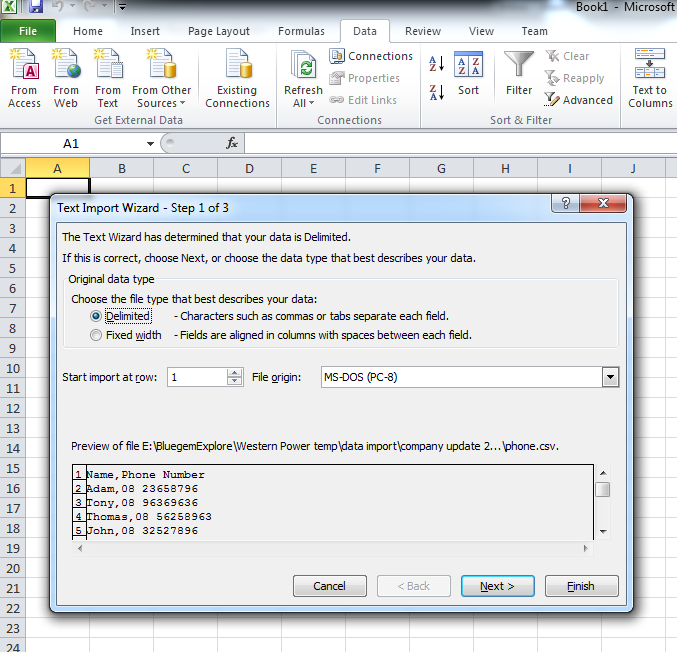


List
string path = HttpContext.Current.Server.MapPath("~/xxxxxxxx.txt");
if (!System.IO.File.Exists(path))
{
// Create a file to write to.
using (StreamWriter sw = System.IO.File.CreateText(path))
{
sw.WriteLine("-------------------------------------------------------------------------------------------------------------------------------------");
sw.WriteLine("-------------------------------------------------------------------------------------------------------------------------------------");
sw.WriteLine("------------------------Some explanation of the purpose of this file-----------------------------");
sw.WriteLine("-------------------------------------------------------------------------------------------------------------------------------------");
sw.WriteLine("-------------------------------------------------------------------------------------------------------------------------------------");
}
}
using (StreamWriter sw = System.IO.File.AppendText(path))
{
StringBuilder sb = new StringBuilder();
sb.AppendLine("- - - - - - - - - - - - - - - - - - - - - - - - - - - - - - - - - - - - -");
sb.AppendLine("- - - - - - - - - - - - - - - - - - - - - - - - - - - - - - - - - - - - -");
sb.AppendLine("WHEN: " + DateTime.Now.ToString());
sb.AppendLine("WHO: " + GetCurrentUser());
IPHostEntry host;
host = Dns.GetHostEntry(Dns.GetHostName());
foreach (IPAddress ip in host.AddressList)
{
if (ip.AddressFamily.ToString() == "InterNetwork")
{
sb.AppendLine("WHERE: " + ip.ToString());
break;
}
}
sb.AppendLine("WHAT: " + errorMsg);
sb.AppendLine();
sb.AppendLine();
sb.AppendLine();
sw.WriteLine(sb.ToString());
}
find and run the following executable inside "%Windows\Microsoft.NET\[framework number]\[version number]\"
aspnet_regsql.exe
if the control you are looking for is a button:
((Button)e.CommandSource)
if the control you are looking for is a label:
((Label)e.CommandSource)
var width = $telerik.$(window).width() * 0.8;
var height = $telerik.$(window).height() * 0.95;
ExpWindow.setSize(width, height);
ExpWindow.center();
protected void
StiWebDesigner1_SaveReport(object sender,
protected void RadGrid1_DetailTableDataBind(object source, Telerik.Web.UI.GridDetailTableDataBindEventArgs e) { GridDataItem dataItem = (GridDataItem)e.DetailTableView.ParentItem; switch (e.DetailTableView.Name) { GetDataByParentId(dataItem.GetDataKeyValue("Id").ToString()); } }
StringBuilder sb = new StringBuilder();
TextBox TextBox1 = new TextBox ();
TextBox1.ID = "TextBox1";
TextBox1.Text = "Hello World";
using (StringWriter sw = new StringWriter(sb))
{
using (HtmlTextWriter tw = new HtmlTextWriter(sw))
{
TextBox1.RenderControl(tw);
}
}
datetime value can be updated using the following query:
e.g. I want to replace the year value with '2012'
update table1
set date = convert(datetime,'2012'+'-'+convert(varchar(3),MONTH(date))+'-'+convert(varchar(3),DAY(date))+' '+ convert(varchar(12),convert(time,date))),
CompletedDate = convert(datetime,'2012'+'-'+convert(varchar(3),MONTH(CompletedDate))+'-'+convert(varchar(3),DAY(CompletedDate))+' '+ convert(varchar(12),convert(time,CompletedDate)))
where [condition]
I can add a new column to an existing table no problem, but i had problem making it an autoincrement int primary key. After some research I found the solution: "Identity" keyword:
if not exists(SELECT * FROM INFORMATION_SCHEMA.COLUMNS WHERE TABLE_NAME = 'table1' AND COLUMN_NAME = 'ID')
begin
ALTER TABLE dbo.table1
add ID int identity not null
end
go
I have this line to run a javascript from code behind:
ScriptManager.RegisterStartupScript(this.Page, this.Page.GetType(), "sbScript", sbScript.ToString(), false);
This line is inside pageload event of the usercontrol that I used my my aspx page. The user control is used multiple times on the aspx page. The javascript is therefore called multiple times. However the script only works the first time.
The reason being is because the script name specified is always "sbScript" which has been assigned value when first run. The solution is to make sure the script name is set to different values everytime the line is executed.
I converted my website to a web application and upgraded .net framework from v3.5 to v4. I also setup a class library to host entity framework models for the web app to consume. At run time when the business logic calls the entity framework class library I got this error below.
 |


