deploy mvc 4 razor application onto shared hosting 404 default document not found error
the solution for me is to have this under
also you need to make sure your hosting environment is setup for .net v4.x and integrated mode
the solution for me is to have this under
also you need to make sure your hosting environment is setup for .net v4.x and integrated mode
ViewData/ViewBag : only eixsts for single controller request on single view
Imaging there is a many to many relationship between category and product and there are some specific information required on this many to many relationship, therefore we need a dedicated entity CategoryProduct to work with. On submission I need to validate whether the combination of category and product selections already exist.
in validation controller provide:
public JsonResult ValidateCategoryProduct(int? categoryProductId, int categoryId, int productId)
{
if (!categoryProductId.HasValue)
{
categoryProductId = -1;
}
var validationResult = categoryProductRepository.ValidateCategoryProduct(categoryProductId.Value, categoryId, productId);
if (validationResult)
{
return Json(true, JsonRequestBehavior.AllowGet);
}
else
{
string output = "This category product relationship has already been setup.";
return Json(output, JsonRequestBehavior.AllowGet);
}
}
in my model I have
[DisplayName("CategoryId")]
[Remote("ValidateCategoryProduct", "ValidationLogic", AdditionalFields = "CategoryProductId,ProductId")]
[Editable(true)]
public int CategoryId { get; set; }
[DisplayName("ProductId")]
[Required(ErrorMessage = "Please select a Product")]
[Remote("ValidateCategoryProduct", "ValidationLogic", AdditionalFields = "CategoryProductId,CategoryId")]
[Editable(true)]
public int ProductId { get; set; }
in my view I have the following under the category textbox
@Html.ValidationMessageFor(model => model.CategoryId, "*")
I also have the following under the productid textbox
@Html.ValidationMessageFor(model => model.ProductId, "*")
now we are good to go, the only issue left is that we need to figure out a way to apply validation result to both properties at once..... puzzled at the moment.
.CellAction(cell=>{
if (cell.Column.Title == "Delete" && cell.DataItem.ChildRecords.Count > 0)
{
cell.HtmlAttributes["style"] = "visibility:hidden";
}
})
alternatively:
columns.Template(
@
).Title("Delete");
RadDatePicker1.get_dateInput().get_selectedDate().format("dd/MM/yyyy");
$('[id*=ddlCountry] option:selected').text()
IF NOT EXISTS(select * from sys.DEFAULT_CONSTRAINTS where NAME like 'def_myconstraint1%')
BEGIN
ALTER TABLE mytable1
ADD CONSTRAINT def_myconstraint1 DEFAULT 1 FOR mycolumn1
END
GO
tried to use text-align:center didnt work, the correct way is:
width: 10240px ;
  margin-left: auto ;
  margin-right: auto ;
asp.net web application update web.config SMTP settings in global.ascs application_start():
headache solved after search and search and search for solutions:
regular expression for character range:
e.g. between 1 and 500:
^.{1,500}$
on one page my checkboxlist shows up correctly, on another it never does. After hours of trying I figured this out: assign CheckBoxList class to your css class of the checkboxlist, play with the properties inside the class will help you fix the issues.
.CheckBoxList input
{
margin-left: -10px;
}
.CheckBoxList td
{
padding-left: 10px;
width:80%;
}
--1.make sure all records have a value in the column
update [TableName]
SET [ColumnName] = [Default Value]
--2. change the column to not null
ALTER TABLE [TableName]
ALTER COLUMN [ColumnName] [data type] NOT NULL
GO
--3. add default value constraint to the column
ALTER TABLE [TableName] WITH NOCHECKADD CONSTRAINT [DF_DefaultName] DEFAULT [Default Value] FOR [ColumnName]
GO
I have 3 projects, one with the entity model, another one with the OData v3 service generated from the entity model, the third one is an asp.net web application.
During local development the service reference I added into the web app is from same solution: http://localhost:55001/MyModelService.svc
After everything was successfully tested I then published the service project and hosted it on a third party hosting service. I was able to browse the service successfully by going: http://service.myapp.com/MyService.svc
I then re-added the existing service reference into my web app with the remote url shown above, published the web app on another hosting service.
When I load up the web app I got an error:
DataServiceQueryException was unhandled by user code
An error occurred while processing this request.
The issue turned out to be really fundamental which I missed out through all my WCF learnings: the cross domain policy xml!
The solution is to add a clientaccesspolicy.xml into the OpenAccess Service WCF app root folder with the following content:

Step 1:
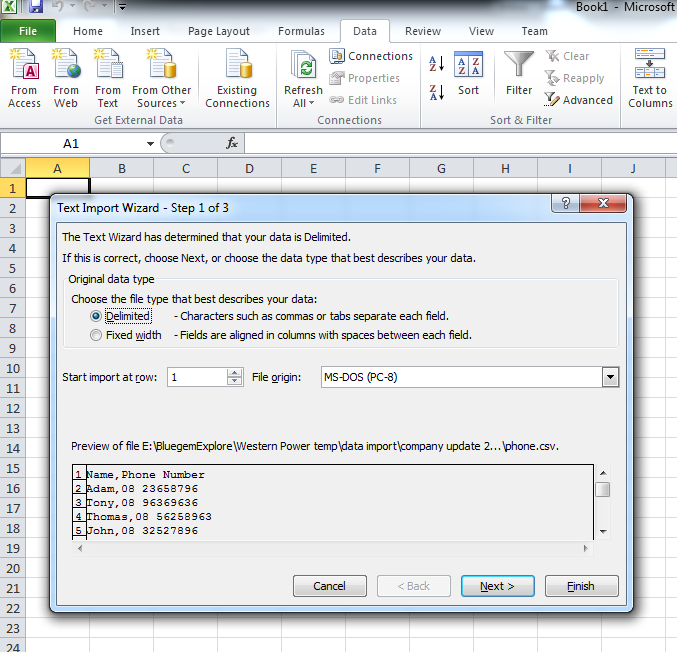
Open EXCEL, click on tab "Data", select "From Text".
Step 2:
Browse to your local file folder and open the .csv file.
Step 3:
In the "Text Import Wizard - Step 1 of 3" popup, select "Delimited" and click on "Next".


 |


